

 Feedback in the Telegram bot is a mechanism that allows bot users to communicate with its developers or administrators. It can be implemented for various purposes, for example, for reporting problems, suggesting improvements to the bot, asking questions about usage, or any other kind of communication
 How to create a feedback bot in Telegram for collecting inquiries Creating a Telegram bot for collecting customer inquiries
Feedback in the Telegram bot is a mechanism that allows bot users to communicate with its developers or administrators. It can be implemented for various purposes, for example, for reporting problems, suggesting improvements to the bot, asking questions about usage, or any other kind of communication How to create a feedback bot or a feedback module for Bot T?
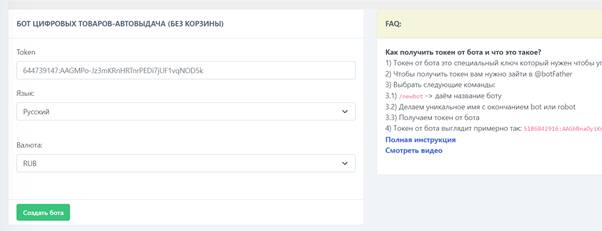 If you need a bot for answering questions or a bot for processing incoming requests, then the bot service t is ready to provide you with such an opportunity, release a token for the bot in @botfather (how to get a token for a bot?) choose the bot type and enter the bot token on the website bot-t.com
After successfully creating a bot template, you can safely make a bot in Telegram for feedback messages
I recommend that before you start creating a feedback bot, watch the video course on our YouTube channel here
Creating a feedback module for a Telegram bot
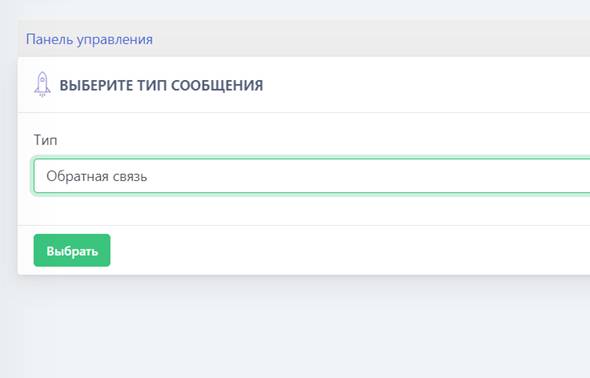 To get started, we will need to purchase a Full plan or higher. Once the plan has been purchased, you need to go to “Free messages” and create a new message using the green button
 Setting up the feedback module in the Telegram bot
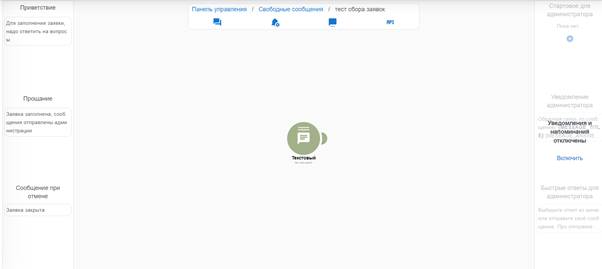 Setting up the feedback bot allows you to create any bot in Telegram for communication, such as:
-Survey bot
-Requests bot
-Feedback bot
The first thing you will see when entering the module is a window like this (see screenshot)
And a beginner may not understand what, where, and how to do it. But don’t worry! It’s actually simple.
On the left are static blocks that, when the module action is initiated, provide ready-made information, for example:
Greeting – this is the text shown when entering the module (works like the /start command in the bot)
Farewell – this is the text shown at the end, when the user has responded and gone through all your feedback steps
Message on cancellation - this is the text shown when the user cancels going through your feedback steps early
Basic configuration of the feedback module in the Telegram bot
This circle in the center is the main feedback setting; there are 4 types of circles in total:
Text - only text can be edited and created
File response – when the user is required to send a certain type of file to upload to your bot for later viewing
User survey – a regular survey or a survey with a ready-made answer
Multiple answers – when the user has a branch of questions they can choose from
More details about circle settings here
You can add and delete circles using the mouse (to add a new link, drag the slider to the plus; to delete a link, click the circle and press delete)
Text - only text can be edited and created
File response – when the user is required to send a certain type of file to upload to your bot for later viewing
User survey – a regular survey or a survey with a ready-made answer
Multiple answers – when the user has a branch of questions they can choose from
More details about circle settings here
You can add and delete circles using the mouse (to add a new link, drag the slider to the plus; to delete a link, click the circle and press delete)
How can I view incoming application submissions in the Telegram bot?
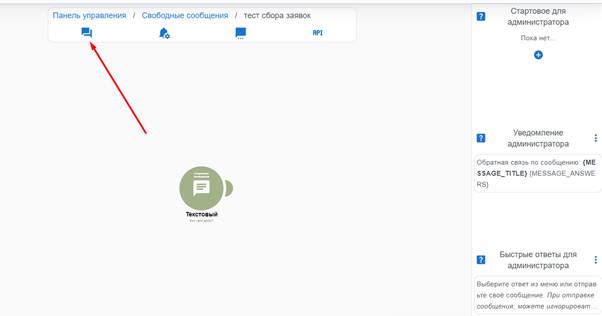 The screenshot shows with an arrow where requests from your feedback come in
There are 2 types of request processing: the first is through the website — go to the button in the screenshot and process the request (you can reply or make a note for yourself by marking the request as read)
The second type is collecting requests through the bot, do all actions directly through Telegram
As soon as you have set up the feedback module, you need to give it a name so you don’t lose it.
After you have given the feedback a name, we need to attach it to a button. For example, let’s create this module for the request collection bot in the greeting by the /start command
What does feedback look like on the website bot t?
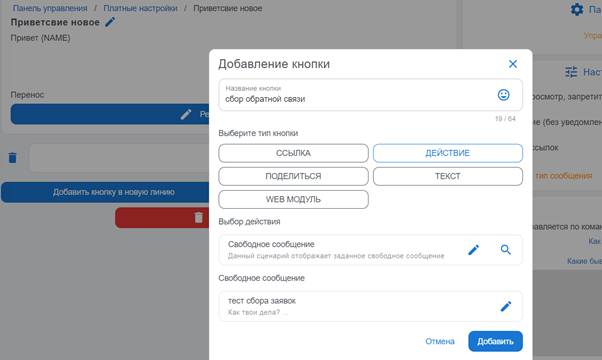 This is what the finished attachment of feedback to the welcome button looks like
 What does the feedback button look like in a Telegram bot?
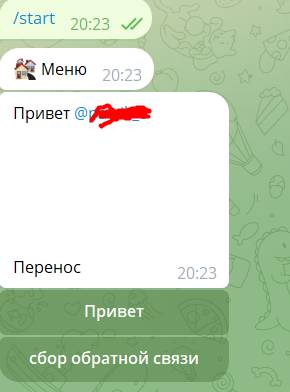 And this is what this button looks like in Telegram.
 What is the benefit of a feedback module in a Telegram bot?
 The feedback module in the Telegram bot is a tool that allows users to communicate directly with the bot’s developers or administrators.
 The importance of the feedback module in a Telegram bot
This module may be useful for several reasons:
1. Collecting feedback: Users can share their experience using the bot, suggest improvements, or report issues and bugs.
2. Product improvement: The feedback received can be used to improve the bot’s functionality and user interface.
3. Bot for communicating with customers: When users see that their opinion is valued and taken into account, it can increase their loyalty and satisfaction with using the bot.
4. User support: The feedback module can serve as a channel for providing help to users who encounter difficulties while using the bot.
5. Quick response: The ability to promptly receive and respond to user messages makes it possible to solve emerging problems faster and maintain a high level of user satisfaction.
6. Data collection: Analyzing feedback can provide valuable insights into how users interact with the bot, what is popular, and what needs improvement.
7. Community building: Providing a communication channel can help create a community around the bot, which in turn can help spread the bot and increase its popularity.
8. Transparency: An open feedback channel creates the impression of transparency and openness on the part of the developers, which can strengthen users' trust in the bot.
1. Collecting feedback: Users can share their experience using the bot, suggest improvements, or report issues and bugs.
2. Product improvement: The feedback received can be used to improve the bot’s functionality and user interface.
3. Bot for communicating with customers: When users see that their opinion is valued and taken into account, it can increase their loyalty and satisfaction with using the bot.
4. User support: The feedback module can serve as a channel for providing help to users who encounter difficulties while using the bot.
5. Quick response: The ability to promptly receive and respond to user messages makes it possible to solve emerging problems faster and maintain a high level of user satisfaction.
6. Data collection: Analyzing feedback can provide valuable insights into how users interact with the bot, what is popular, and what needs improvement.
7. Community building: Providing a communication channel can help create a community around the bot, which in turn can help spread the bot and increase its popularity.
8. Transparency: An open feedback channel creates the impression of transparency and openness on the part of the developers, which can strengthen users' trust in the bot.