How to add a bot to a Telegram channel/chat/group
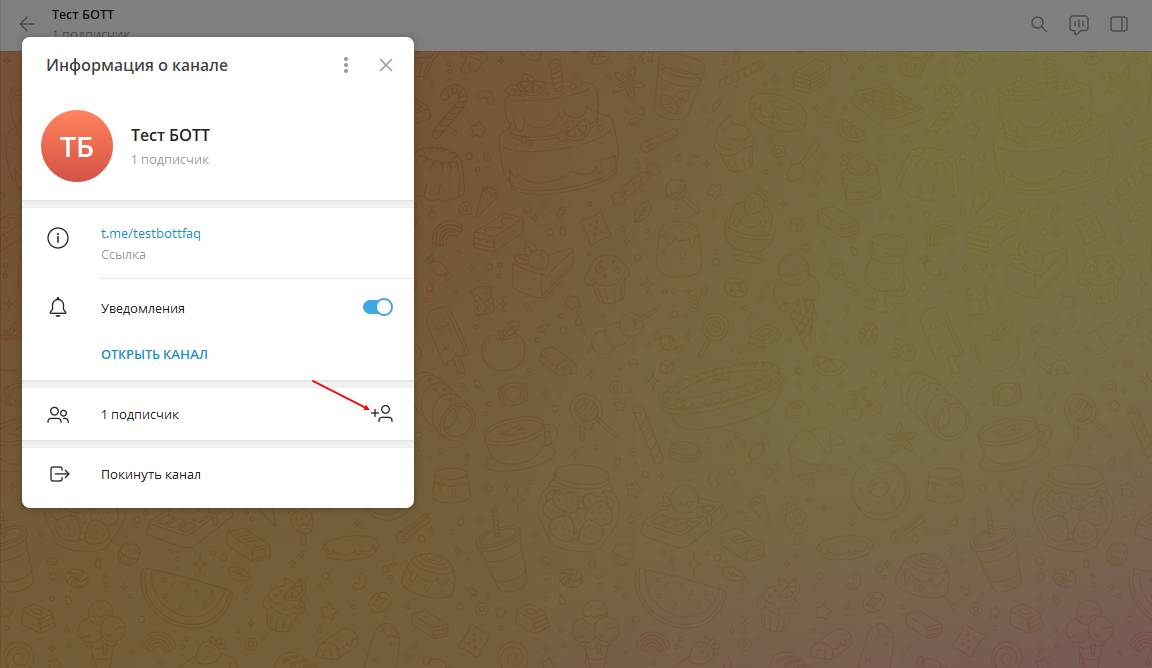
The principle of adding a bot to a Telegram channel/chat/group is the same as adding a regular participant: copy the bot's @username and paste it when adding a user
Important! The bot must be an administrator in the channel
How to create a Telegram channel
To create a Telegram channel, follow these steps:
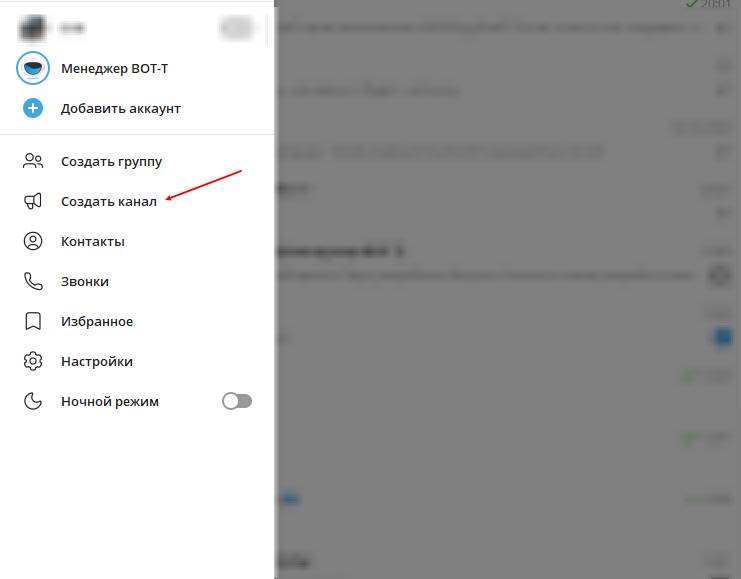
1. Open the Telegram app and tap the "Menu" icon (three horizontal lines) in the top left corner.
2. Select "Create Channel".
3. Set the channel name, add a description, and choose an image for the cover.
4. Then choose the channel type: "Public" (available to everyone) or "Private" (available only by link).
5. Next, add channel administrators as needed, who will manage the content.
6. After that, you can start publishing content in the channel.
Your Telegram channel is now created and ready to use!
What is a secret chat in Telegram?
Secret chat in Telegram is a feature that ensures the privacy and security of correspondence. Here are some features of secret chats:
1. Privacy: All messages in secret chats are protected from access by third parties, including Telegram developers. This means that messages are not stored on Telegram servers and cannot be viewed even by administrators.
2. Message self-destruction: In secret chats, you can set a message self-destruction timer. This means that messages will be automatically deleted after a certain time after being read.
3. Screenshot protection: Secret chats have a feature enabled that prevents taking screenshots of the screen in the Telegram app.
4. No forwarding: In secret chats, messages cannot be forwarded to other users.
5. Encryption: Secret chats use end-to-end encryption, which provides a high level of security for transmitted information.
To start a secret chat in Telegram, select a contact from the friends list, open the chat menu, and choose "Start Secret Chat".
How can I turn a chat into a forum with topics in Telegram?
To create a forum with topics in Telegram, you can use a bot or a special service for organizing discussions. Here are a few steps that may help you create a forum with topics in Telegram:
1. Creating a bot: You can create a bot in Telegram that will manage the forum. To do this, you need to contact the official bot @BotFather and create a new bot. After that, you will receive a token that will be needed to manage the bot.
2. Setting up commands: Configure commands for the bot that will allow users to create new topics, reply to messages, view the list of topics, etc.
3. Creating a channel or group: Create a channel or group in Telegram where topics and discussions will be posted. You can configure access rights for the channel or group so that only the bot can publish new topics.
4. Developing the interface: Develop an interface for the bot that will allow users to create new topics, reply to messages, view the list of topics, etc.
5. Publishing topics: Start publishing topics in the channel or group using the bot so that users can begin discussing them.
free of charge and without programming knowledge BOT-T.COM